Google AI Overview and SEO: A Complete Strategy Guide for 2025
You build content to rank high on Google.
 Mira Chen10 min read
You build content to rank high on Google. But AI Overviews now answer user questions directly on the search page, cutting off traffic. That's the reality for 2025. Google AI Overview and SEO are no longer about click-through rates — they're about earning a spot in those AI-generated summaries. This guide lays out what actually works: clear content structure, strong E-E-A-T signals, and covering topics holistically instead of chasing keywords. These tactics help your site get cited by AI Overviews, not just ranked on page one. Here's how to adapt your SEO strategy for 2025.
What are Google AI Overviews and why should SEOs care?
AI Overviews are Google's AI-generated summaries that appear at the top of search results. They pull information from multiple sources to answer a user's question directly on the page. Instead of clicking through to a website, the user gets the answer right there. For SEOs, this changes everything. The Google AI Overview and SEO relationship now forces you to improve for being cited inside those summaries, not just for ranking in the traditional blue links.
How AI Overviews work behind the scenes
Google's AI first classifies the user's query and determines the intent. Is it a "how-to" question? A comparison? A fact lookup? Then the system selects sources from its index based on authority and relevance. It prefers content that demonstrates E-E-A-T signals and directly addresses the topic. Finally, it generates a summary with citations and links to the sources it used.
The key point: AI Overviews don't just extract one snippet from a single page. They combine information from several high-authority pages. That means your content needs to be full enough to cover the subtopics the AI might combine.
The difference between AI Overviews and featured snippets
| Feature | AI Overviews | Featured Snippets |
|---|---|---|
| Length | Multi-sentence paragraph (often 100+ words) | Single paragraph (usually 40–60 words) |
| Sources | Multiple sources stitched together | Single source extracted directly |
| Media | Can include images, video, follow-up questions | Usually text-only with optional image |
| CTR impact | Can drop click-through rates further because answers are more complete | Still drives some clicks, especially for "how-to" queries |
| Optimization | Requires holistic topic coverage across your site | Requires targeted snippet-format content |
The practical difference: For a query like "how to clean cast iron", a featured snippet might show a short list of steps from one site. An AI Overview might combine a step list, a note about seasoning, and a warning about soap — all from three different sources. You can no longer just aim for a single snippet box. You need content that covers the full topic so the AI sees your site as a primary reference.
How do AI Overviews affect click-through rates and traffic?
AI Overviews sit at the top of search results, pulling answers straight from pages. That changes where the clicks go. But not all queries are hit the same way.
When AI Overviews reduce clicks—and when they don't
Simple questions get the worst traffic drop. If someone searches "what is the capital of France," the Overview gives the answer in a single line. Nobody clicks through. For complex or factual queries with short answers, organic traffic can fall by 30% to 50% depending on the niche.
High-intent commercial queries behave differently. A user searching "best budget laptop for video editing" gets a comparison table in the AI Overview. But they still need to read full reviews, check specs, and compare prices. So they click. For high-intent commercial searches, click-through rates barely change. People want details the Overview can't fit.
Local and transactional queries also hold up. Searches like "coffee shop open near me" or "buy Nike Air Max 2025" lead to maps or product listings. AI Overviews don't replace those results yet. The data shows local click-through rates remain stable.
| Query type | Impact on organic traffic | Why |
|---|---|---|
| Simple factual answer | High drop (30-50% less clicks) | User gets answer directly |
| High-intent commercial | Minimal drop | User needs more details to decide |
| Local / transactional | Stable | Maps and product listings still drive clicks |
The pattern is clear: AI Overviews eat traffic for surface-level answers, not for decisions that require digging.
Redefining SEO success beyond clicks
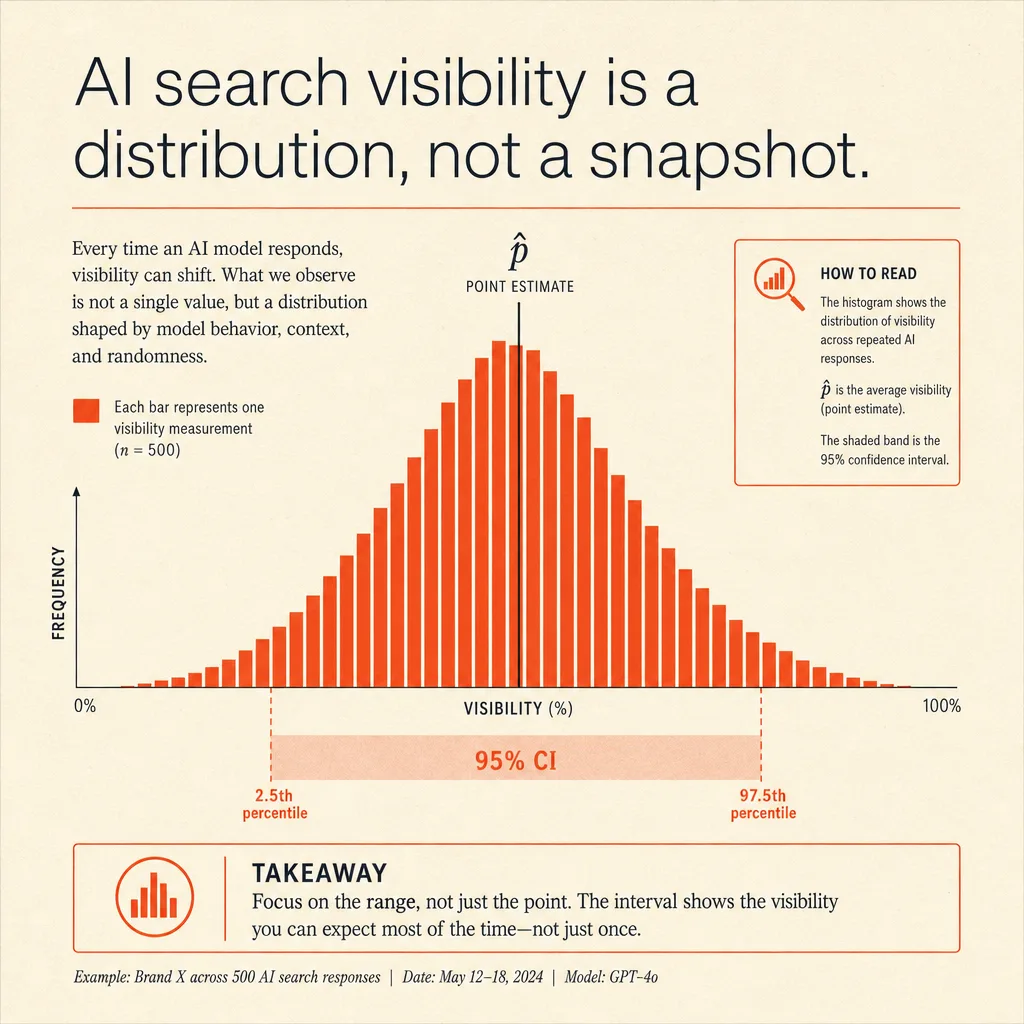
Here's the real shift. When your page gets cited inside an AI Overview, users don't always click. But they see your brand. That visibility matters for future searches. Google AI Overview and SEO now means tracking impressions and citations, not just clicks.
Three metrics replace raw traffic:
- Brand impressions – how often your site appears in Overviews. You can check this in Google Search Console under the "Search appearance" report.
- Citation frequency – how many Overviews link to you. Each citation builds authority.
- Secondary actions – users who read your page after an Overview often stay longer. Dwell time goes up. They might search your brand directly later.
Don't ignore clicks entirely. But if your traffic drops while citation counts rise, that's not a loss. It's a shift in how your brand gets found.
Use Search Console's "AI Overviews" report to see which queries trigger your content. Then focus on answering those queries fully. Google's system favors pages that cover the topic from all angles, not just one keyword.
Bottom line: Google AI Overview and SEO success isn't measured by CTR alone. Watch where your brand shows up and how often users come back for more.
What content strategies make you eligible for AI Overviews?
AI Overviews pick content that answers the full question, not just a keyword. If your page covers one narrow angle, Google’s AI will look elsewhere. The shift from keyword matching to topic completeness is the biggest change in Google AI Overview and SEO for 2025.
Write for topics, not just keywords
A query like “best running shoes for flat feet” isn’t one question. It’s several: What type of support? What brands? How to test them? How long do they last? AI Overviews reward pages that address the full intent behind that search.
Build topical clusters. Use sub-headers for related questions — “How to tell if you have flat feet,” “Can running shoes fix arch pain?” — and connect them with internal links. Thin content that only repeats “best running shoes” gets ignored. full coverage gets cited.
Structure content for quick extraction
AI Overviews scan for clear signals. H2 and H3 headers that mirror natural questions make it easy for the system to pull your answers. Put the key response in the first paragraph of each section.
Use bulleted lists for features, numbered steps for processes, and comparison tables for specs. This structured format gives the AI ready-to-use fragments. One example: A table comparing arch support height across three shoe models is more likely to appear in an Overview than a paragraph describing each shoe.
Build E-E-A-T into every page
Google’s AI checks who wrote the content and whether it’s trustworthy. Include author bios with links to professional profiles — LinkedIn, university pages, or work. Cite primary sources: official studies, industry reports, or direct experiments. Avoid linking to generic blogs or unverified forums.
Keep the page updated. A post from 2021 about running shoe tech is less reliable than one reviewed in 2024. Add a “last updated” date. Regular updates signal that the information is current, which directly boosts eligibility for AI Overviews.
The single most critical insight: Structure your content so an AI can find the answer in the first sentence of each section. Everything else — topic coverage, E-E-A-T, formatting — supports that goal. Get that right, and your page becomes a prime candidate for citation.
How can you monitor and adapt to AI Overviews over time?
Tracking how AI Overviews affect your site isn't guesswork. You have two reliable methods: Google Search Console data and third‑party tools. Both tell you if your informational pages are losing traffic to AI summaries.
Using Search Console to infer AI Overviews impact
Search Console won't show a direct "AI Overviews" tag. But you can infer the impact by comparing impressions and clicks for your top informational queries.
Look at queries that historically brought traffic but now show a sudden click drop without a ranking change. That pattern often means an AI Overview is stealing the click. Compare performance before and after AI Overviews rolled out in your region. If clicks dropped 20‑40% on terms where you still rank in the top 5, AI Overviews are likely the cause.
The real signal is a drop in clicks without a drop in ranking. That tells you users are getting the answer on the search page and not bothering to scroll down.
Third‑party tools and manual testing
Tools like Semrush and Ahrefs now track AI Overviews as a SERP feature. You can filter your target queries and see which ones trigger an AI summary. This saves manual effort.
| Method | What it shows | Best for |
|---|---|---|
| Google Search Console | Clicks vs. impressions per query | Detecting traffic loss from AI Overviews |
| Semrush “AI Overviews” report | Which queries have AI summaries | Finding new opportunities or threats |
| Ahrefs “SERP features” filter | AI Overview presence for any keyword | Auditing your content against AI triggers |
| Incognito manual search | Real‑time AI Overview appearance | Spotting format patterns (lists, tables, video) |
Run manual searches in incognito mode for your key terms. Note the format that appears — AI Overviews often favor bullet lists, short paragraphs, or video snippets. If your content follows that format, you have a better chance of being cited.
Document what works. For example, if you see AI Overviews pulling from a competitor's structured FAQ page, adapt your own content to include clear, data‑backed lists.
"Google AI Overview and SEO" isn't set‑and‑forget. You need to check these signals monthly. Queries that trigger AI Overviews change as Google updates its models. A term that didn't trigger one last month might start tomorrow. Keep your content aligned with the formats AI Overviews currently prefer.
Frequently Asked Questions
Will Google AI Overview and SEO changes kill organic search traffic?
No, but traffic shifts from informational to branded and transactional queries. Focus on building authority and giving direct answers to stay visible in results.
How does Google AI Overview and SEO affect e-commerce sites?
E-commerce faces less impact than informational content. Product pages with structured data and clear specs still rank well. Target long-tail and comparison queries for best results.
How do I know if my site appears in AI Overviews?
Use Google Search Console’s performance reports and third-party tools. Also manually test with incognito searches for your target queries to verify visibility.
Can I block my content from appearing in AI Overviews?
Yes, use the 'nosnippet' meta tag or data-nosnippet attributes. Block only if the citation harms your business goals—most sites benefit from the extra visibility.
The key takeaway is that Google AI Overviews are reshaping search visibility, making it essential to align content with structured data and user intent rather than traditional ranking factors. Monitoring these changes through dedicated tools allows you to adapt your strategy and maintain traffic. Monitor your site's AI Overviews presence with Google Search Console — start your free analysis today.
Author
Mira Chen
Mira Chen studies how global brands appear in AI answer engines and turns that evidence into practical GEO workflows.