ChatGPT Brand Monitoring: How to Track Brand Visibility in AI Answers
Learn ChatGPT brand monitoring for AI search: track brand visibility, mentions, citations, sentiment, competitors, and response changes over time.
 Mira Chen14 min read
ChatGPT brand monitoring is the recurring process of checking whether ChatGPT names your brand, cites your sources, recommends competitors, and frames your category position accurately. To track brand visibility in ChatGPT, monitor a fixed set of buyer prompts and record answer presence, brand mentions, citations, sentiment, answer position, competitor share, cited source URLs, and factual accuracy over time.
Start with a manual baseline, then move to a repeatable workflow when the prompt set becomes too large for screenshots and spreadsheets. The core question is not whether one answer looks good today. It is whether ChatGPT repeatedly includes your brand in the answers that influence buyers. This guide shows how to see brand visibility in ChatGPT, how to measure brand mentions in ChatGPT responses, and how to turn the data into content and source improvements. For platform-level context, see the ChatGPT tracker. If you need a product workflow rather than a manual audit, use ChatGPT brand monitoring to track brand visibility in ChatGPT over time. For KPI definitions across AI answer engines, pair this workflow with AI search visibility KPIs.
What is ChatGPT brand monitoring?
Most people think if their brand name appears in a ChatGPT answer, that's visibility. ChatGPT brand monitoring is more specific. It separates raw brand mentions from citations, recommendations, sentiment, source quality, and competitor context so teams can see whether the answer helps or hurts the business.
Three different levels exist, and only one actually helps your business.
Mentions vs. Citations vs. Recommendations
A mention means your brand name shows up in the response. ChatGPT might say “Some users prefer Brand X for data syncing.” That’s just a name drop. No context, no source, no endorsement. It happens because your brand appears in the training data.
A citation goes further. ChatGPT includes a visible source link — usually a URL — that points back to your website or a trusted article about you. This is what you want for referral traffic and credibility.
A recommendation is the strongest signal. The model positions your brand as a preferred option: “For managing multiple accounts, many experts recommend Brand Y.” This is the hardest to earn because it requires consistent positive mentions across diverse sources.
| Type | Example | What it proves |
|---|---|---|
| Mention | "Brand X is an option." | Your brand appears in training data |
| Citation | "Read more at brandx.com/page" | A trusted source links to your site |
| Recommendation | "Use Brand Y for best results." | The model treats you as a top choice |
Why does this matter for ChatGPT brand monitoring? Because if you only track mentions, you might think you're doing well when really no one can click through to your site.
Why Visibility in ChatGPT Is Different from Search Engine Rankings
Search rankings are about getting a page to position #1 for a keyword. You improve a URL, wait for Google’s algorithm to update, and measure your spot.
ChatGPT doesn’t work that way. Its answers are dynamic — they change with prompt phrasing, model version, and even the date of training data cuts. A phrase like “best CRM for small teams” can return completely different brand lists depending on how you ask.
Also, AI visibility is narrative-driven. The model doesn’t just list links. It tells a story. If your brand gets cited in a positive, contextual paragraph — not just dropped into a bullet list — that’s more valuable than a raw mention.
The key difference: SEO targets a single page to rank. AI visibility targets your brand being named across many different queries, in the right context. You’re not trying to win one slot; you’re trying to become part of the model’s default answer pattern.
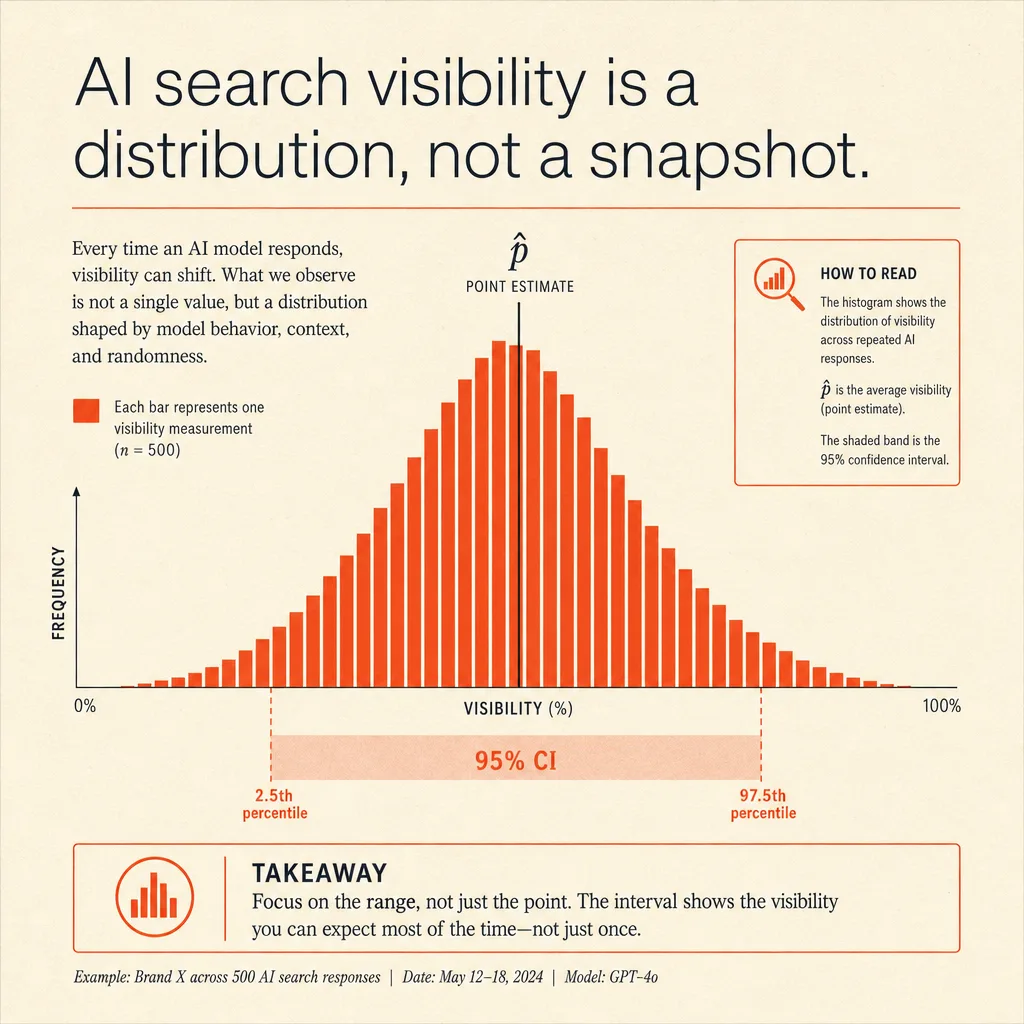
That's why blindly checking one query won't tell you much. You need to monitor how your brand appears in 10 different prompts, across relevant model modes, and note whether mentions turn into citations or recommendations. Only then do you have a real picture of what ChatGPT actually says about you.
How to see brand visibility in ChatGPT
You don’t need a tool or a budget to start. Just OpenAI’s web interface and a list of prompts your real customers would type. The goal is simple: find out if ChatGPT mentions your brand, where, and in what tone. Here’s a repeatable process anyone can run in under thirty minutes.
Step 1: Define Your Core Prompts
Start with prompts your audience actually uses. Two types matter most.
Prompts with your brand name – test whether ChatGPT returns correct, up-to-date info. Example: “Tell me the best features of [your brand].” If the response is outdated or wrong, you have a visibility problem.
Prompts without your brand – these reveal organic, unprimed mentions. Example: “Best software for social media scheduling in 2026.” If your brand doesn’t appear here, but competitors do, that’s a gap.
Build a list of 5 to 10 prompts. Include broad requests (“top marketing tools”) and specific ones (“how to schedule Instagram posts automatically”). Record each prompt in a spreadsheet. This takes about ten minutes.
Step 2: Run the Queries and Record Outcomes
For each prompt, run a fresh ChatGPT session. Copy the full response or take a screenshot. Then log three things in your spreadsheet.
- Did your brand appear? Yes or no.
- Position in the response. First mention, second, or later.
- Any link or citation? Click it. Does it point to your actual site?
If your brand doesn’t appear in any response, that's a clear visibility gap. If it appears but the link is broken or wrong, that’s an accuracy issue. Note all of this.
Do the same for competitors. If you run prompts without your brand and only see competitors, that tells you who owns the conversation. Run the queries across the model modes your buyers are likely to use, because responses often differ.
Step 3: Analyze the Sentiment and Narrative
Now interpret what you collected.
Sentiment. Is your brand described as good, neutral, or problematic? Look for phrases like “reliable,” “limited,” or “often causes issues.” If ChatGPT lists complaints alongside your features, the narrative is mixed.
Context. Does your brand appear as the main recommendation or buried at the end? Does the response list competitors directly next to you? That comparison shapes reader perception.
Accuracy. Are the facts right? Model version, pricing, features — if any are wrong, your visibility is misleading. That can hurt trust when users check the source.
One insight matters more than the rest: If ChatGPT consistently misses your brand in unprompted queries, that’s the biggest risk. It means your brand doesn’t exist in the AI’s training data or current context window. Fixing that starts with better public data — press releases, updated websites, structured content.
This entire process costs nothing but thirty minutes. Run it monthly. Track how responses change. You’ll see exactly how to see brand visibility in ChatGPT without guessing.
How to track brand performance in ChatGPT responses over time
To track brand visibility in ChatGPT over time, keep the prompt set stable and measure the same signals every cycle. A one-time screenshot can show a problem, but it cannot show whether your fixes are improving the answer pattern.
Use a simple operating rhythm:
- Keep 20 to 50 priority prompts in one sheet or tracker.
- Run the same prompts on the same schedule.
- Record whether your brand appears, where it appears, and which competitors appear.
- Note citations, source links, sentiment, and factual errors.
- Add a short action note for each gap, such as "update comparison page" or "build source coverage."
The useful trend is not one response changing. The useful trend is whether ChatGPT begins to mention your brand more often, cite better sources, describe your category position more accurately, and include you in recommendation prompts where competitors already appear.
The same workflow applies to DeepSeek brand monitoring, but the source mix and citation patterns should be measured separately by platform.
If the issue is citation quality rather than measurement, use the companion guide on how to get cited in ChatGPT to prioritize source and content fixes.
ChatGPT brand visibility metrics to monitor
A useful ChatGPT brand monitoring report should show more than a yes-or-no mention. Track the metrics below for each prompt set.
| Metric | What to record | Why it matters |
|---|---|---|
| AI answer presence | Whether your brand appears in the response | Shows basic inclusion in buyer-facing answers |
| Brand mention rate | Share of tracked prompts that mention your brand | Creates a stable baseline for visibility movement |
| Citation rate | Share of responses that cite your domain or trusted sources about you | Proves whether the answer can send users to evidence |
| Sentiment | Positive, neutral, mixed, or negative framing | Reveals whether visibility is helping reputation |
| Answer position | First mention, middle, end, or cited only | Measures prominence inside the generated answer |
| Competitor share of answers | Which competitors appear for the same prompts | Shows who owns the category narrative |
| Cited page or source URL | Exact owned or third-party URL referenced | Tells content teams what sources shape the answer |
| Accuracy | Correctness of pricing, feature, category, and positioning claims | Finds misinformation before it spreads |
Use the same definitions in every cycle. If one team counts any brand mention as a win while another counts only source-backed recommendations, the trend line becomes useless.
Free vs platform-based ChatGPT brand monitoring
Manually checking a handful of ChatGPT queries works when you only have a few brand terms. But when you need to track how your brand shows up across hundreds of possible prompts, manual checks don't scale. Automated tools can monitor mentions, surface the sources ChatGPT relies on, and flag sentiment shifts over time. If you want to know how to see brand visibility in ChatGPT across your entire market, these platforms do the heavy lifting.
What to Look For in a Visibility Tracker
The most useful tools share a few core capabilities. Prompt tracking lets you save specific queries and see how your brand’s position changes when you run them again — for example, whether you appear in the top 3 results or drop off entirely. Source attribution tells you which websites ChatGPT is citing when it talks about your brand. If a competitor’s blog keeps showing up and yours doesn’t, that’s a signal to fix your content strategy.
Sentiment analysis automatically tags each mention as positive, negative, or neutral. Without it, you'd have to read every response to know if the context helps or hurts you. Competitor benchmarking shows your share of voice compared to rival brands in the same category. That comparison tells you if you're losing ground even when your own mentions look stable.
Popular Tools Overview
You can choose from general SEO suites that added AI tracking features or dedicated tools built specifically for generative engine optimization. The table below compares three options.
| Tool | Key Feature | Best For |
|---|---|---|
| Semrush AI Visibility Toolkit | Share of voice and sentiment tracking | Teams already using Semrush for SEO |
| Profound | Citation source analysis | Pinpointing which sites influence AI answers |
| Wordlift | Entity SEO and structured data | Improving how AI understands your brand |
Semrush fits easily into existing SEO workflows. You set up your brand name and key queries, then track share of voice and sentiment over time. Profound goes deeper into which individual articles or pages are being cited in ChatGPT responses — useful for content teams who need to know what to edit. Wordlift focuses on entity recognition, helping you structure your site so AI models parse your brand correctly.
Most of these tools offer free trials or limited free tiers. Test one against a handful of your brand’s most common queries before committing to a subscription. The right tool depends on whether you need basic monitoring or citation-level analysis. Either way, you’ll get a clearer answer to how to see brand visibility in ChatGPT at scale without guessing.
How to Turn Visibility Data Into Actionable Improvements
Once you know how to see brand visibility in ChatGPT, the real work starts. Data alone doesn't fix anything. You have to turn it into specific changes. Here’s the order that works.
Fix Content and Technical Foundations
Start with your own website. If ChatGPT can't find clear information about your brand, it won't mention you. Fix the content gaps first — they cost you the most visibility.
Three things matter most:
-
Entity descriptions. Use schema markup for Organization, Product, and FAQ. This tells search engines — and by extension, ChatGPT — exactly who you are and what you do. Without schema, the model has to guess from scattered text.
-
Definitive pages. Create pages that answer the top 10 questions people ask about your industry or product. ChatGPT draws from authoritative sources. If your site is the clearest answer, it gets cited.
-
Backlinks from trusted sites. Domain authority still counts. A mention on a high-traffic news site or industry blog tells ChatGPT your brand is credible. Focus on quality, not volume.
Don't try to fix everything at once. Pick the biggest gap from your visibility check — usually missing schema or weak authority — and address that first.
Monitor Changes and Repeat the Check
Visibility data is not a one-time read. You need to track it over time.
- Re-run your manual test monthly. Use the same prompts you used before. Compare the responses. Did your fixes move the needle? If not, dig deeper into what's still missing.
- Set up alerts in your monitoring tool. New mentions, positive or negative, give you real-time feedback. A sudden drop in mentions signals a content or authority problem.
- Adjust your strategy based on the gaps. If you fixed schema but still see zero mentions for product-related queries, your content might not be deep enough. Add detailed guides, case studies, or comparison pages.
A simple table helps track progress:
| Month | Brand Mentions (manual test) | Sentiment | Key Fix Applied |
|---|---|---|---|
| Jan | 0 | N/A | Added schema |
| Feb | 1 | Neutral | Created FAQ page |
| Mar | 3 | Positive | Built backlinks |
This approach keeps you honest. You see what works and what doesn't — no guesswork.
Frequently Asked Questions
How to see brand visibility in ChatGPT for free?
Run manual queries with relevant prompts in a fresh session. Document mentions and sentiment. Compare results across weeks. This gives a baseline without spending money.
How to see brand visibility in ChatGPT change over time?
Track shifts manually after each model update. Changes in source content also alter responses. Regular checks every two weeks catch trends. Update your records to stay accurate.
What’s the most important metric for ChatGPT brand visibility?
Share of voice – the percentage of relevant prompts where your brand appears versus competitors. This ratio gives a clear picture of your visibility compared to others.
Do links to my website help ChatGPT mention my brand?
Indirectly yes. ChatGPT often cites authoritative pages. Building high-quality backlinks increases the chance your site appears in responses. Focus on trusted, relevant sources.
Tracking brand visibility in ChatGPT requires consistent monitoring of mentions, citations, sentiment, and the sources shaping each answer. The brands that improve fastest are the ones that turn those findings into specific content, source, and positioning fixes.
Author
Mira Chen
Mira Chen studies how global brands appear in AI answer engines and turns that evidence into practical GEO workflows.